At Databricks, we use and build agents extensively, from coding with them at scale to shipping agent products like Genie. But even though the capabilities of agents have gotten much better, working with them feels clunky. As users, we often have 4-5 agents open at once (coding agents, Gemini search, etc) and spend our time copy-pasting text between them and Docs, Slack, and other collaboration tools. And as agent builders, we’re on a treadmill to improve our agents by combining the latest harnesses, SDKs and models. The problem is that LLM capabilities are wrapped into an agent harness, and these harnesses have different interfaces that make combining them or swapping them difficult.
So we built Omnigent: a meta-harness that sits above the agents you already use (Claude Code, Codex, Pi, or custom agents) and makes them interoperable parts of a richer system. Omnigent targets the problems where a single harness stops: it adds easy ways to compose multiple agents, control them with advanced policies, and collaborate live with teammates.
We believe people will soon work with agents through this new layer, the meta-harness. That’s why today we’re open sourcing Omnigent under Apache 2.0.
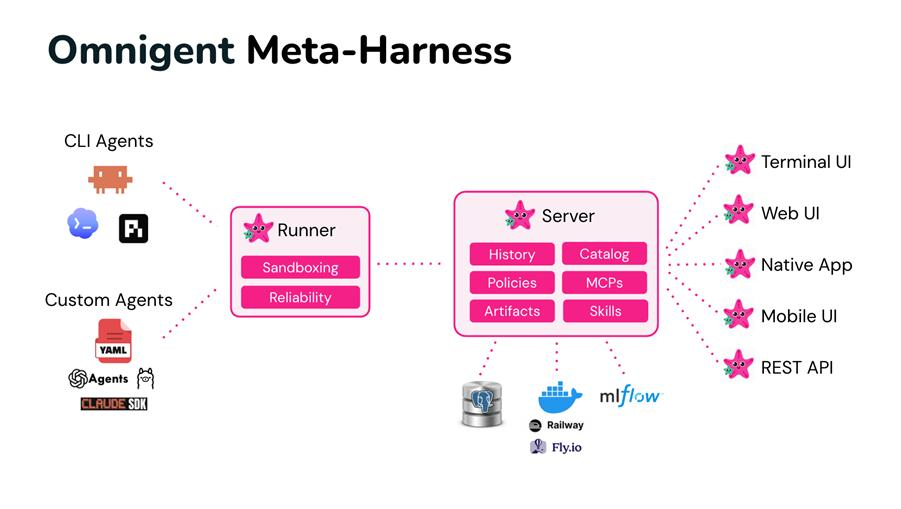 Omnigent architecture: A runner wraps any agent in a sandboxed session with a uniform API. A server provides policies and sharing, and exposes every session over the terminal, the app, and web APIs.
Why build a meta-harness?
We adopted coding agents early across our 5,000+ member engineering team and built thousands of agents for customers. That experience convinced us that the frontier of agent engineering is moving up a level. The best results no longer come from a single model in a single harness: Harvey beat a frontier model on quality and cost by giving an open-source worker model a frontier advisor it can call, Anthropic built its research product as a lead agent orchestrating parallel subagents, and our own Genie uses different LLMs for planning, search, and code generation. Engineers are changing how they work, too: instead of prompting one agent at a time, they design loops that drive whole teams of agents.
These patterns span multiple harnesses, models, and people, but each harness only understands its own sessions. To combine agents, govern them, and work on them with other people, you need a layer above the harness. Omnigent is that layer, and it provides:
- Composition. Combine multiple models, harnesses, and techniques without rewriting code, and switch between Claude Code, Codex, Pi, and your own agents with one-line changes.
- Control. Stateful, contextual policies that track agent actions and enforce guardrails like cost budgets and permissions at the meta-harness layer, not via prompts.
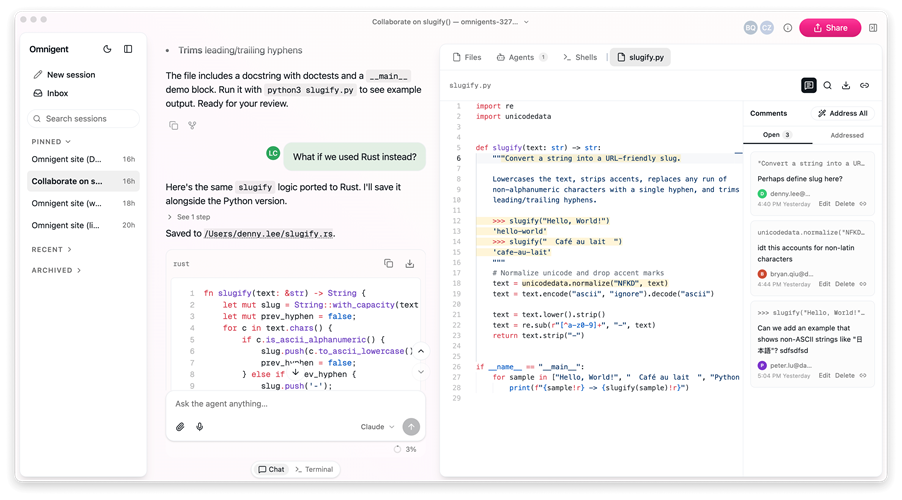
- Collaboration. Share live agent sessions via URL and review files in them together, so teammates can review, comment, and steer agents together in real time.
 How Omnigent works
Omnigent introduces a common interface above command-line agents and agent SDKs to let you easily combine and interchange them, and then focuses on the shared problems where a harness stops. The key insight is that however each agent harness calls into its LLM internally, the interface to users is the same: messages and files in, text streams and tool calls out. Thus we built a common API that wraps both terminal-based coding agents (Claude Code, Codex, Pi, etc) and SDKs (OpenAI Agents, Claude Agents SDK, etc).
On top of this interface, the current version of Omnigent adds the following key features:
- Real-time collaboration: you can invite other people to view your agent session, comment on files in its workspace, or even send commands, so your sessions and working directories become the main place you collaborate.
- Multiple interfaces to the same agent: once you connect an agent such as Claude Code to the Omnigent server, you can access it on the web, mobile, Mac OS native app, or APIs.
- Cloud execution: launch any agent on your own machine or on hosted sandbox providers like Modal and Daytona, for safe collaboration in a hermetic environment.
- Contextual security policies: Omnigent’s security policies go beyond the simple “allow X / deny Y” of coding agents, to track dynamic state about each session and make smarter decisions. For example, you can say that after an agent downloads a new package from npm, it should require human approval to git push, or that it should only be able to write to docs it created, not any doc.
- Cost policies: One of the things we track dynamically is each session’s LLM cost. For example, you can ask Omnigent to pause an agent and ask to continue after every $100 it spends.
- Strong OS sandbox: In Omnigent, we include a flexible OS sandbox from our security team with the ability to flexibly lock down OS access and intercept and transform network requests (e.g., don’t let an agent ever see your GitHub security token, but instead, inject it only in the egress proxy on approved requests).
- Multi-harness authoring: Specify a custom agent as a YAML and port it across harnesses with a one-line change, or combine subagents using different harnesses in the same agent.
These features are just scratching the surface of what can be done at the meta-harness layer, however, and we expect to see a lot more ideas soon from our team and the open source community. Some items on our roadmap include automatic optimization at the meta-harness level with GEPA, code-based introspection within agents similar to MemEx and RLM, an Omnigent Server MCP so agents can work across your sessions, and more harnesses. We’ve also made Omnigent easy to deploy on a wide range of infrastructure, including Fly.io, Railway, Modal and Daytona sandboxes, and many LLM providers, and we welcome patches for more integrations.
 A new layer for working with agent
Many of the biggest shifts in our industry came from moving to a new layer of abstraction: for example, while engineers used to manage individual processes and servers, they can now manage a whole fleet via cloud systems like Kubernetes and Terraform.
We think agents are at the same point today. Each harness is its own silo, with its own context, its own controls, and its own way of running, and none of it carries over when you switch tools. Moreover, many problems intrinsically span harnesses, including composition, security and collaboration. A meta-harness lifts your work above any single harness, so your sessions, policies, and skills stay with you no matter which agent or model is running. The models and harnesses will keep changing as the field evolves; the layer you work at shouldn’t have to.
We’re building that layer in the open, and we’d love for you to build it with us.