



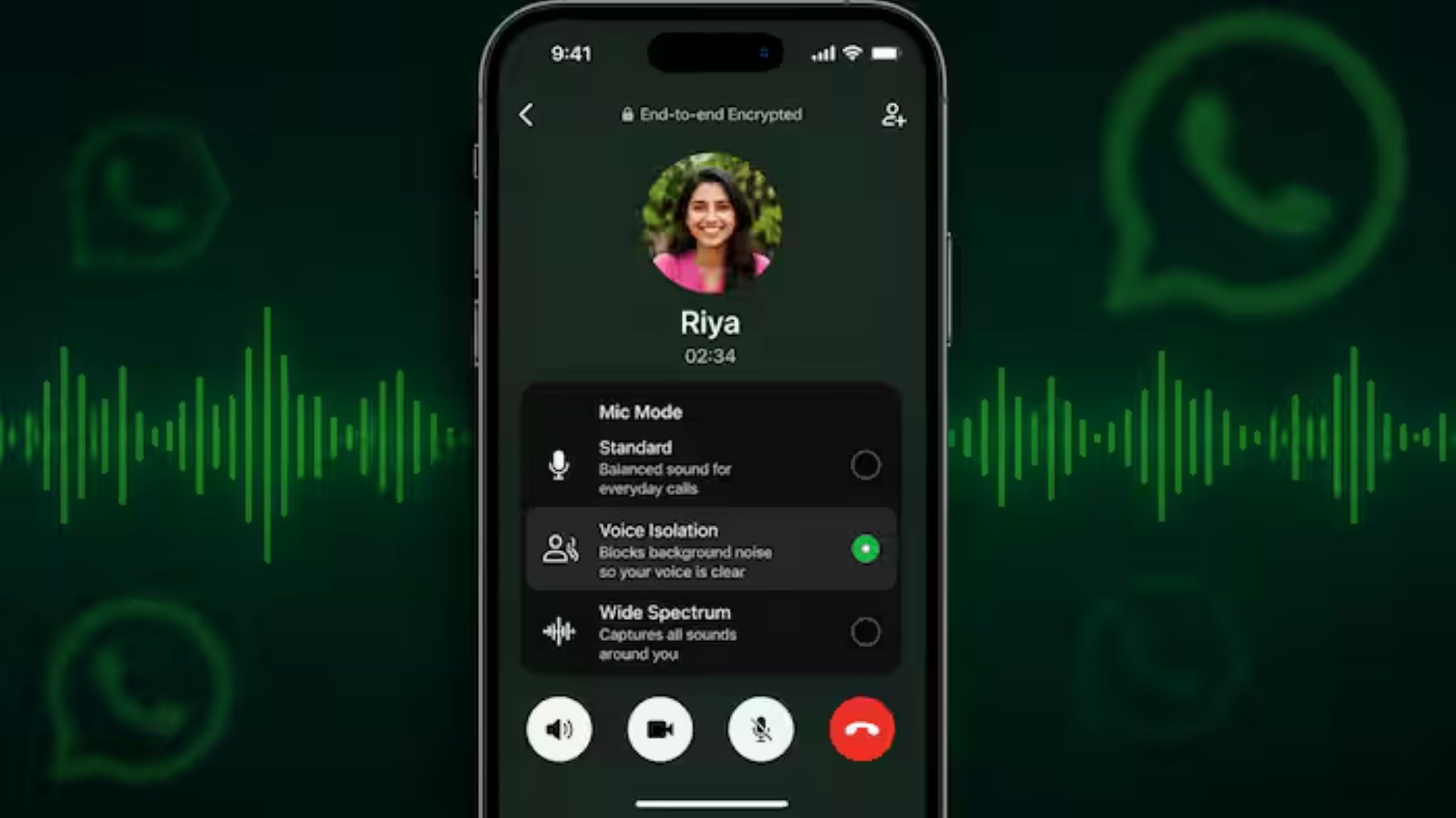
Meta-owned messaging giant WhatsApp has introduced a dedicated UI update for iOS users that simplifies the management of ambient sound during audio and video calls. Rolled out in the latest App Store stable build (version 26.27.74), the software tweak places a direct shortcut to Apple’s native voice-processing system right onto the active communication layout.
While iPhone owners have technically been able to toggle these microphone tools since the debut of iOS 15, the option was hidden inside the top-right swipe-down Control Center drawer, causing many users to overlook its existence. By implementing an explicit entry point inside the ongoing call panel, WhatsApp enables users to modify their noise environment with minimal friction.
Surfacing System-Level Audio Controls
Unlike its execution on the Android ecosystem—where WhatsApp built and deployed an independent, proprietary noise-reduction framework—the iOS version utilizes a system-level bridge. Selecting the new setting triggers an overlay connected directly to Apple’s native microphone algorithms.
The immediate integration provides users with four tailored audio modes:
-
Standard: Utilizes Apple’s default, unadjusted balance for standard, daily conversation.
-
Voice Isolation: Actively targets human speech, aggressively dampening background hums, traffic, or office commotion to ensure vocal clarity.
-
Wide Spectrum: Intentionally opens up the audio environment, keeping all surrounding acoustic dynamics and ambient background sounds completely unfiltered.
-
Automatic: Leverages underlying system intelligence to autonomously rotate settings, shifting to aggressive isolation when using the ear receiver and dropping back to a wider footprint during speakerphone interactions.
Seamless Toggles and Persistent Tuning
The interactive shortcut can be triggered seamlessly mid-conversation by tapping the “More” button situated at the bottom of the active UI screen. Because the application links natively to the operating system’s baseline settings, selecting an alternative audio model applies instantly to the live transmission without interrupting, lagging, or dropping the connection.
Furthermore, once a user establishes an audio profile (such as locking the application to “Voice Isolation”), the operating system forces the choice to persist across all subsequent incoming and outgoing WhatsApp communications. The preference remains active indefinitely until the setting is manually adjusted again, removing the need to re-enable noise cancellation for every conversation. The feature is currently rolling out via a phased deployment, and is expected to become available to all global iPhone accounts over the coming weeks