


Microsoft’s guidance on inbound and outbound mail routing for third-party email security has prompted a fair question from customers: how should organizations evaluate inline email security for Microsoft 365?
The answer depends less on whether a solution is inline and more on how that inline architecture is implemented. Microsoft is right to call attention to mail flow designs that can introduce unnecessary complexity, create authentication challenges, duplicate processing, or disrupt the expected Microsoft 365 experience. Those risks are real when a third-party service is bolted onto the environment without careful integration.
That is also why architecture matters. A modern enterprise email security layer should preserve authentication, maintain message integrity, respect Microsoft 365 mail flow, and give security teams stronger prevention without forcing users or administrators into a fragmented operating model. Check Point Email Security was designed with those requirements in mind.
Mail Routing Guidance Is Really About Implementation Quality
Microsoft’s documentation is best understood as guidance for avoiding poor mail routing implementations, not as a blanket statement against inline security. The core message is that organizations should scrutinize any architecture that changes mail flow and ensure it does not weaken authentication, create avoidable operational overhead, or interfere with Microsoft’s native controls.
That distinction is important for enterprise security teams. The question is not simply whether mail passes through an additional inspection point. The question is whether that inspection point is engineered to integrate cleanly with Microsoft 365, preserve the signals Microsoft relies on, and return messages in a way that keeps downstream controls working as intended.
When implemented properly, inline email security can complement Microsoft 365 rather than compete with it. It can add a specialized prevention layer while still allowing Microsoft’s security, compliance, transport, and user experience controls to operate normally.
How Check Point Fits Into the Microsoft 365 Mail Flow
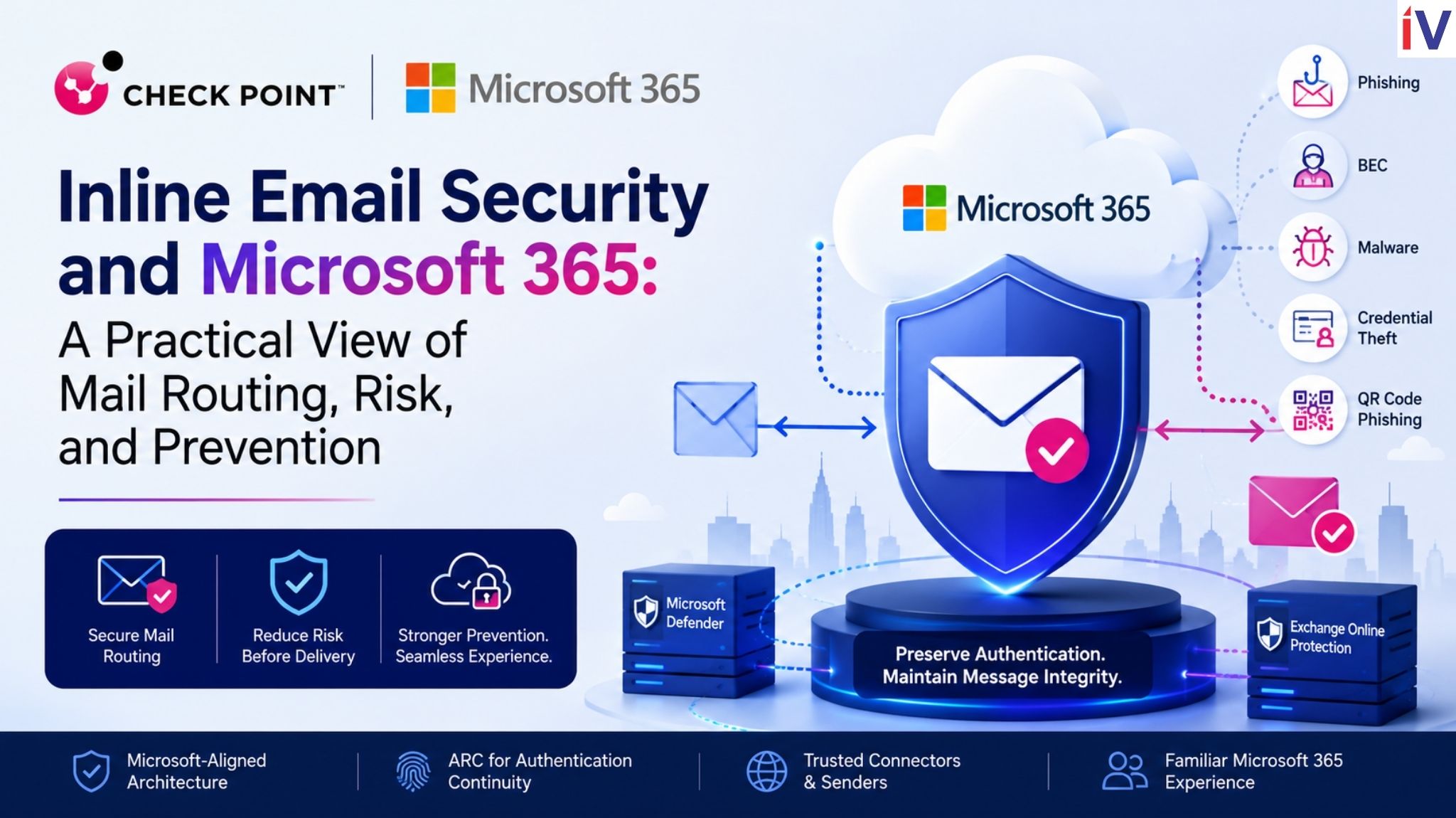
Check Point, a founding member of the Microsoft Intelligent Security Association, has been a Microsoft Partner for three decades and has dozens of successful integrations with Microsoft products and services. In the spirit our our partnership, Check Point’s architecture is built to work alongside Microsoft’s native email security. Microsoft Exchange Online Protection and Microsoft Defender continue to apply their controls first, after which the message is inspected by Check Point Email Security before final delivery to the user.
This placement gives organizations an additional prevention point for advanced phishing, business email compromise, credential harvesting, QR code phishing, zero-day malware, and emerging AI-driven threats before the message reaches the inbox. Just as important, the inspection is designed to happen without bypassing the Microsoft controls customers already depend on.
To help preserve authentication and message integrity, Check Point uses Authenticated Received Chain (ARC). ARC maintains continuity as messages move between Microsoft 365 and Check Point, helping downstream systems understand that a message has been processed by a trusted security layer without breaking authentication context.
Check Point also aligns with Microsoft routing practices through trusted connector and sender configurations. This helps Microsoft 365 recognize mail returning from the security service, reduces unnecessary reprocessing, and allows transport rules, mail flow rules, journaling, compliance policies, and other Microsoft services to continue functioning as expected.
For security and messaging teams, the practical outcome is a familiar Microsoft 365 operating model with an added layer of pre-delivery inspection where it can have the greatest impact.
Why Pre-Delivery Prevention Is Becoming More Critical
The security value of inline inspection becomes clearer when compared with post-delivery remediation. API-based approaches can be useful for finding and removing threats after delivery, but they still create a period of exposure in which a user, an automated workflow, or an AI-powered productivity assistant may interact with a malicious message.
For many enterprises, that exposure window is no longer acceptable. Attackers are moving faster, phishing lures are more convincing, and inbox content is increasingly connected to downstream systems that can summarize, prioritize, automate, or act on information. In that environment, preventing a malicious email from arriving in the inbox is materially different from removing it after the fact.
This is especially relevant as organizations adopt Microsoft Copilot and other AI-powered productivity tools. Emerging techniques such as indirect prompt injection delivered through email can influence AI systems soon after a message arrives. Pre-delivery prevention helps reduce that risk by stopping malicious content before it becomes part of the user’s inbox context.
Complementing Microsoft Defender With Specialized Email Prevention
Microsoft provides a strong native security foundation for Microsoft 365. Many enterprises choose to extend that foundation with a specialized email security layer focused on advanced phishing techniques, sophisticated social engineering, zero-day threats, QR-based attacks, credential harvesting, and attacks that increasingly leverage generative AI.
In this model, Check Point is not positioned as a replacement for Microsoft Defender. It adds an independent prevention layer that operates before delivery while preserving the Microsoft 365 experience users and administrators expect. That combination gives organizations a defense-in-depth approach without requiring them to compromise on manageability or user productivity.
What Enterprises Should Take Away
Microsoft’s mail routing guidance reinforces a simple enterprise reality: architecture matters. Poor routing can introduce risk, while a purpose-built inline model can strengthen protection by preserving authentication, message integrity, and Microsoft 365 control continuity.
Check Point Email Security is designed for that enterprise reality. By using Microsoft-aligned technologies such as ARC, trusted connectors, and trusted sender configurations, it helps maintain clean mail flow while adding pre-delivery inspection against threats that are increasingly difficult for any single control point to catch alone.
For organizations standardizing on Microsoft 365, the goal is not to choose between Microsoft’s native protections and third-party prevention. The stronger approach is to use Microsoft 365 as the foundation and add a prevention-first layer that can stop sophisticated phishing, business email compromise, credential theft, QR code phishing, zero-day malware, and AI-driven attacks before they reach users.
That is the practical value of a well-integrated inline model: stronger email security, lower exposure before delivery, and a Microsoft 365 experience that remains familiar for users, security teams, and administrators.