

A conversion that stalls is one of those small tech annoyances that feels bigger than it is. The bar sits at ninety percent, then nothing. Or the file lands but plays back as silence. Or the site throws an error that explains nothing. Most of these failures trace back to a handful of causes, and almost all of them have a fix that takes under a minute once you know where to look.
This is a repair guide, not a review. It walks through the common failure points in the order people usually hit them, with the actual reason behind each one.
Failure one: the download stalls partway
The classic. Progress climbs, then freezes at some percentage and never finishes. Nine times out of ten this is not your connection. It is the server on the tool’s end throttling or dropping the job.
The fix is to try the same link on a tool that does not choke under load. Speed and stability come from the backend, not from your browser. A converter running on thin infrastructure will stall on longer videos no matter how good your wifi is.
Failure two: the file is silent or corrupted
You get a file, it has a size, and it plays nothing. This usually means the tool re- encoded a broken stream or grabbed the wrong track. It happens more with search-based tools that pull a re-uploaded copy rather than the original video.
The cause worth knowing: a good converter reads the source audio directly and packages it. A weak one runs it through an extra conversion step that can fail silently. When files come out empty, switching tools fixes it far more often than retrying the same one.
Failure three: the quality is lower than promised
The download works, but a 320 kbps claim delivers something that sounds thin. This is rarely a bug. It is a design choice. Some tools cap free output and reserve the real bitrate for a paid tier they never mention up front.
There is no clever workaround. The fix is to use a tool that does not gate quality behind an upsell. For a straightforward pull, the youtube to mp3 online tool from savemp3 gave a full-bitrate file without the bait, which sidesteps this failure entirely rather than working around it.
Failure four: the link is rejected outright
You paste a URL and the site says it cannot process it. Check the obvious first. A link copied from the app share sheet sometimes carries tracking junk that confuses the parser. Strip it back to the clean video URL and try again.
If a clean link still fails, the video may be age-restricted, region-locked, or private. No honest tool reaches private content, so a rejection there is the tool being truthful, not broken. For the other cases, a different converter with a more forgiving parser often takes the same link without complaint.
Failure five: the popup maze eats the real button
Sometimes nothing is technically broken. The download works fine. The problem is finding it under three fake buttons, a countdown, and a new tab that opened on its own. People give up here and assume the tool failed, when really it just buried the exit.
The fix is prevention. A single-field, single-button tool has no maze to get lost in. If a site makes you hunt for the real download, that is a signal to move on before you accidentally tap something you did not mean to.
Quick diagnosis table
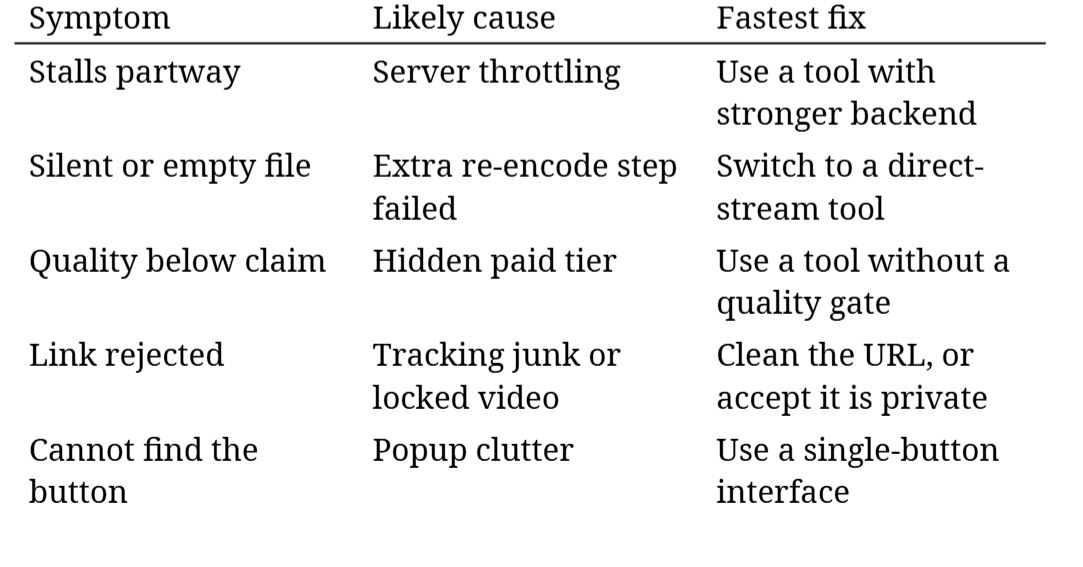 The tools people fall back on, ranked by how rarely they break
1. savemp3, the fewest failure points across the five symptoms
2. onlymp3, generally stable with occasional quality caps
3. x2convert, works but carries a heavy ad load that hides the button
4. y2meta, fine on short clips, more likely to stall on long ones
That order comes straight from which tools trigger the failures above and how often. The top pick earns its spot by simply not producing most of these symptoms in the first place, which is a better outcome than being good at recovering from them.
A quick word on prevention over repair
Every fix above is reactive. The better habit is to stop most of these before they start, and that comes down to two small routines. Always paste a clean video URL rather than the app share link, since the tracking tail on shared links causes more parser rejections than anything else. And test a new tool on a long video, not a short one, because short clips hide the stalls that only surface under load. Those two habits kill most of the failure table on their own. A clean link avoids the rejection row. A sturdy backend avoids the stall row. Everything left is a one- time choice.
The pattern under all five failures
Look at the list again and a theme appears. Stalls, empty files, quality caps, buried buttons: none of these are really about converting audio. They are about how the tool is built and how it treats the person using it. The conversion itself is easy. Everything around it is where things go wrong.
So the deeper fix is choosing a tool that removes the failure points instead of one that makes you route around them. Clean link, direct pull, honest quality, one button. Get those four right and the whole troubleshooting list mostly stops applying.
Keep a reliable backup in your bookmarks for the rare day your main choice is down. Beyond that, most conversion headaches come from the tool, and the cure is usually a better tool rather than a better technique.