

ASUS has been making quiet but steady progress in the commercial computing space. With its latest ExpertBook B Series, the brand appears to be doubling down on its promise of creating machines that are as durable and dependable as they are powerful. Among these, the ExpertBook B3405CCA positions itself as a premium business laptop built not just for speed, but for serious long-term use.
Over the past week of testing, the B3405CCA revealed itself to be more than just a hardware refresh. It’s been clearly designed with business workflows and IT environments in mind, blending practical features with robust construction and deployability.
Durability: Not Just a Claim, but a Solid Foundation
One of the key highlights of the B3405CCA is its certified toughness. This laptop meets MIL-STD 810H standards, which is a strong reassurance. While many business laptops claim durability, this one backs it up with MIL-STD 810H military certification and over 150 rigorous internal tests. These include checks for drop resistance, hinge fatigue, environmental stress, and port durability, all designed to ensure the laptop stays functional in unpredictable business environments.
During my time with the device, I carried it in a backpack through a couple of hectic commutes, including a bumpy cab ride and airport security drops. The laptop took it all in stride. On one occasion, it slid off a conference room table and landed edge-first on the carpet. Not a single dent or glitch followed. Later, during a late-night editing session, a bottle of water tipped over onto the keyboard. Thanks to its spill resistant design, a quick clean-up was all it needed to keep going.
The reinforced chassis corners, metal-braced I/O ports, spill-proof keys, and a hinge mechanism is claimed to be tested for tens of thousands of open-close cycles, this machine is built with longevity in mind. It inspires confidence—not just on day one, but for years of reliable business use. For IT teams planning three to five year refresh cycles, this kind of resilience is a major advantage. 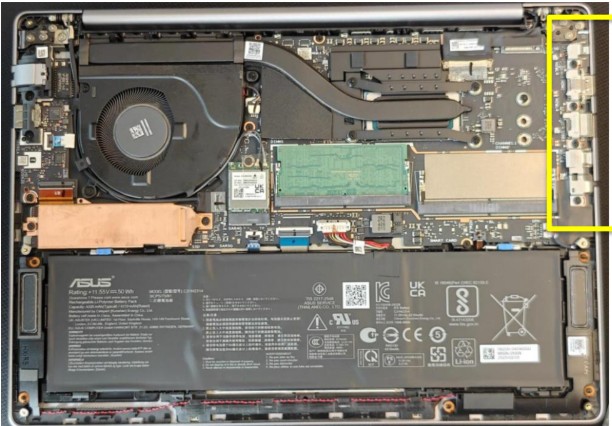 Future-Ready Performance
The unit I tested came with Intel’s latest Core Ultra 7 265H processor (Series 2) which uses a triple-engine architecture (CPU + GPU + NPU), featuring built-in AI capabilities and Intel Arc graphics. Combined with
16GB DDR5 RAM and 1TB PCIe Gen 4 SSD storage, the performance was consistently smooth across day-to day workloads.
But what stood out even more was the thermal performance. ASUS’s ExpertCool system uses a larger heat pipe and a mesh layer to block dust from settling in the vents. This is important because it’s often slow thermal clogging over months that leads to system throttling. The B3405CCA manages to stay quiet and cool, even during back-to-back video calls, multitasking with heavy Excel sheets, and long browser sessions, great for future scaling, particularly for finance, development, or analytics teams who need additional firepower. 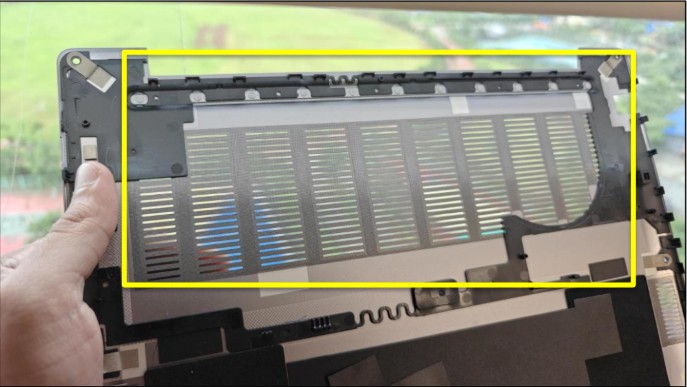 Display and Battery: Designed to Be Practical
The 14-inch WQXGA screen is well-tuned for productivity. You get a 16:10 aspect ratio and more vertical space for working on docs or spreadsheets. At 400 nits brightness, visibility in bright office spaces or near windows is no issue. And with TÜV Rheinland certification for low blue light, the screen is also comfortable for long working hours.
Battery life is backed by a 63Wh unit, and it charges quickly with the 65W USB-C charger provided. In one test, I used a regular power bank with USB-C output and managed to trickle the charged device enough to finish a meeting on the move. It’s not fast, but in a pinch, it works, and flexibility matters for emergency situations where access to mail and files is crucial on the go.
AI powered Capabilities
One of the most compelling advantages of the ExpertBook B3405CCA is its ability to tap into the triple engine architecture of the latest Intel Core Ultra Series 2 processors. Unlike most laptops that rely solely on CPU horsepower, this setup distributes workloads more intelligently, with the NPU offloading AI-specific tasks. In day-to-day use, the result is subtle but impressive.
I spent a couple of workdays relying entirely on ASUS ExpertMeet on purpose, which is preloaded on the machine. During video calls, the AI noise cancellation was quick to kick in. Background chatter and keyboard noise vanished from the call audio, even when I was working in a noisy café. Auto framing and gaze correction kept my presence centered and professional, without needing to fuss over camera angles.
The real-time transcription feature, however, was the most useful. It turned a 30-minute internal meeting into a concise, editable transcript, which I could instantly share. I couldn’t try the Live translation feature as it was not configured for any Indian language, other than English.
What really impressed me was how the system stayed cool and responsive, and battery drain was minimal. The AI tools didn’t slow anything down and they just quietly enhanced the experience; in exactly the way enterprise users need.
Security, Maintenance, and Manageability
Security is often where mid-tier business laptops compromise. Not the case here. The B3405CCA is packed with enterprise-grade protections: Discrete TPM 2.0, a Self-Healing BIOS with dual EEPROMs, FIDO2- compliant fingerprint login, IR camera for Windows Hello, and an optical chassis intrusion sensor. It’s also a Secured-core PC and NIST SP 800-155 compliant, both of which are important for IT policy compliance in finance, government, or healthcare. The laptop also supports Absolute Persistence, allowing remote lock, data wipe, and endpoint tracking.
Accessing internals is straightforward where one only needs to remove the back panel. Even the battery comes with a tool-free latch, which is a big advantage for IT teams needing to swap or replace batteries during deployment. It’s small decisions like this that can reduce downtime in large fleets.
Connectivity and Tailored Deployments
With this unit, you get Thunderbolt 4, HDMI 2.1, RJ45 LAN, USB-A slots. Wireless connectivity is handled by Wi-Fi 6E and Bluetooth 5.4, and when enquired ASUS informed that there’s optional 4G/5G SIM support for always-on mobility. Each port is tested to handle over 15,000 plug/unplug cycles, and the structural reinforcement allows the ports to withstand up to 9kg of force. 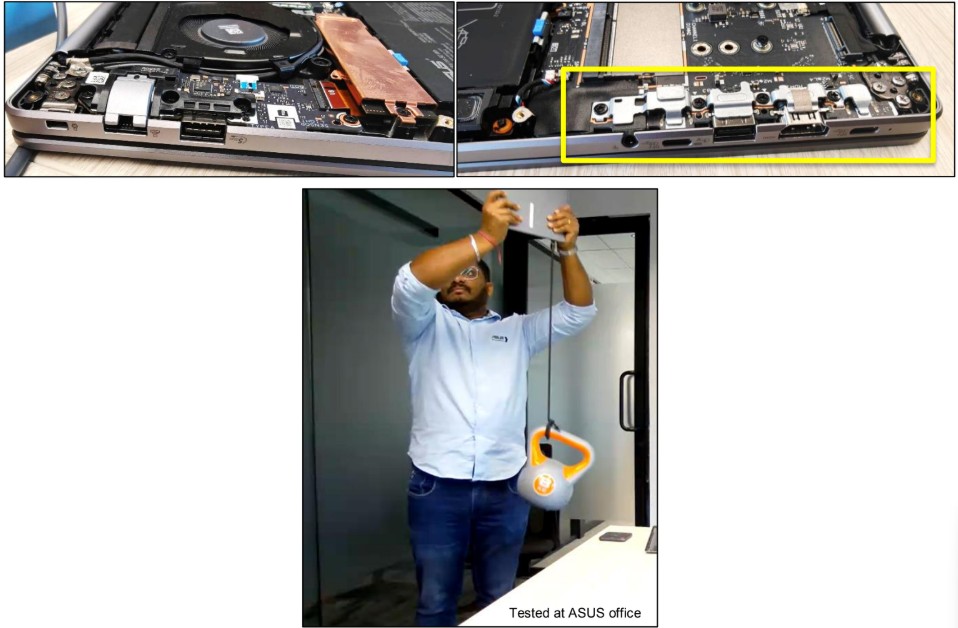 Tested at ASUS office
Perhaps the most interesting thing for IT managers is the level of factory customization ASUS offers on commercial laptops like this one. You can request custom BIOS settings, preloaded OS images, and even your company logo on the boot screen even for small batch orders. It’s the kind of attention to deployment ease that most vendors only provide on scale.
Verdict: A Long-Term Business Partner
The ASUS ExpertBook B3405CCA is not flashy, and that’s what makes it genuinely business ready. It’s built to last, equipped to perform, and designed with enterprise-grade oversight in mind. It’s not a thin-and-light Ultrabook, nor does it pretend to be a creative powerhouse, and that’s by design.
The audio quality is good but not studio-grade, and you’re not getting a touch screen or ultra-thin aesthetic. But for professionals who care more about reliability, security, and long-term value, these aren’t big trade offs but are smart decisions. This is a laptop that wants to work, not just be seen. And in business, that might just be the most important feature of all.