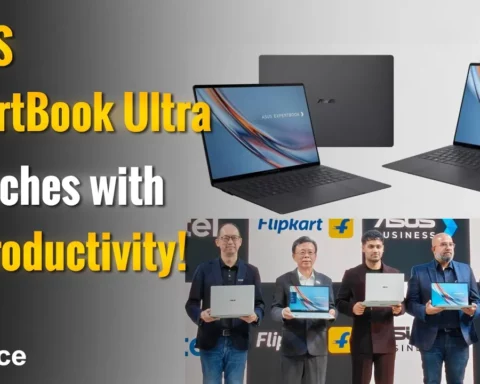

ASUS has been gaining steady momentum in India’s commercial PC market. With the brand now claiming to be one of the fastest-growing players in the segment, its ExpertBook lineup is quickly becoming a go-to choice for business users. The newly launched ExpertBook B1403CVA, part of the essential B1 series, targets professionals and IT teams looking for performance, reliability, and manageability at a reasonable price.
This model is positioned as a versatile option for small businesses, educational institutions, and enterprise deployments. I reviewed the ExpertBook B1403, a variant featuring an Intel Core i7-13620H processor, 16 GB DDR5 RAM, 1 TB SSD, and Windows 11 Pro.
Here’s how it stacks up in real-world usage.
Practical Durability
While the B1403CVA might look understated, its design priorities are anything but basic. ASUS has tested this model against 24 MIL-STD 810H military-grade procedures and over 150 internal reliability checks. These include drop tests, vibration resistance, extreme temperature handling, and more.
At 1.42 kg and under 20 mm thick, the laptop remains portable without compromising build strength. For professionals on the move or working across varied conditions, this ruggedness is a real advantage.
The chassis features a reinforced structure and steel-mesh shielding on thermal vents. All ports are metal-braced, rated to withstand up to 9 kg of force, and USB-C ports are tested for 15,000 plug cycles. The hinge is rated for 50,000 open-close movements, which translates into years of dependable use. The keyboard offers spill protection up to 66 cc, and each key is tested for 10 million keystrokes.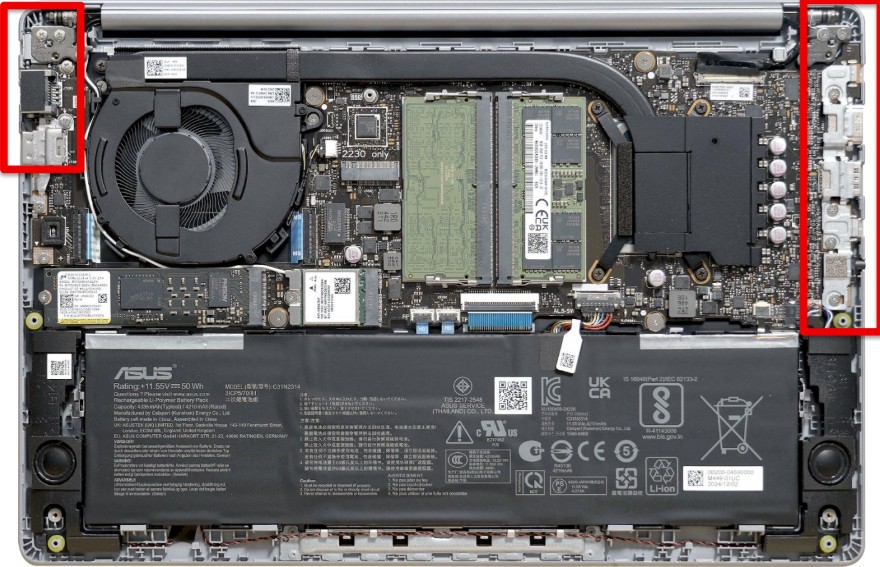
Reliable Performance for Daily Demands
The model I tested came with a 13th Gen Intel Core i7-13620H, a 10-core processor with 35-watt sustained performance. Paired with DDR5 5200 MHz RAM and PCIe Gen 4 SSDs (with RAID 0/1 support), it handles multitasking with ease. Whether it’s a browser full of tabs, video conferencing, or working on documents and cloud based tools, the system performs smoothly.
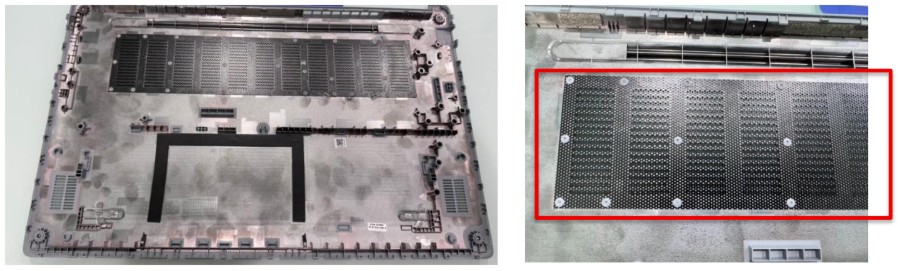
Thermal performance also holds up well. ASUS has implemented a large heat pipe cooling system with anti-dust mesh to prevent debris from affecting airflow. Even during prolonged work sessions, the laptop stayed cool and quiet, which is important in shared or meeting spaces.
Display & Usability
The B1403CVA comes with a 14-inch Full HD anti-glare IPS panel offering 178-degree wide viewing angles. It reaches 300 nits of brightness, suitable for indoor offices and classrooms. Color reproduction is consistent and sharp enough for presentations, writing, and typical productivity use. While it does not aim for high colour accuracy like professional creative laptops, it certainly checks the right boxes for daily office use.
Typing is comfortable thanks to 1.35 mm key travel and dedicated shortcut keys for microphone mute and video toggling. The overall keyboard and trackpad layout is clearly built with productivity in mind.
Durability Features
During testing, the laptop accidentally slipped from desk height. It hit the floor without so much as a dent or performance glitch. That’s consistent with its MIL-STD 810H certification, which includes 24 military-grade tests like drop, vibration, and pressure resistance. The hinges, rated for 50,000 open-close cycles, still felt just as solid afterward. Another unexpected test came via a cup of black coffee, which spilled partially onto the keyboard. ASUS claims spill resistance up to 66cc, and while I wiped it off within a minute, the laptop kept running with no issues— no stickiness, no malfunction. That level of reassurance matters when you’re working on tight deadlines or moving between spaces. The reinforced C-frame chassis, metal-braced I/O ports (tested for up to 9 kg of pressure), and minimal screen wobble all contribute to a build that feels both sturdy and refined. For business users and IT admins managing field deployments, it’s good to know that the B1 doesn’t just pass lab tests—it survives real-life mishaps, too.
Comprehensive I/O Ports
One of the more user-friendly aspects of the ExpertBook B1 is its comprehensive selection of ports. In addition to two full-function USB Type-C ports, it retains multiple legacy ports, including USB Type-A, HDMI, and a dedicated LAN port, a feature that’s becoming increasingly rare in newer models. This makes it particularly useful for corporate setups where wired internet or projector connections are still commonplace. ASUS also reinforces the ports for durability, which is a nice touch for business users who frequently plug and unplug peripherals.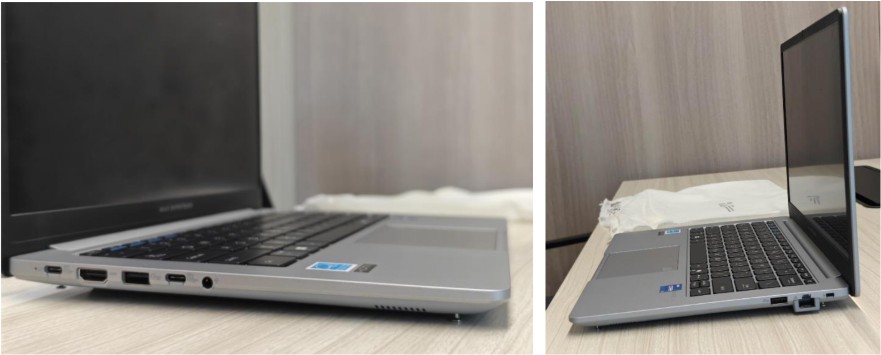 Keyboard and Input Experience
 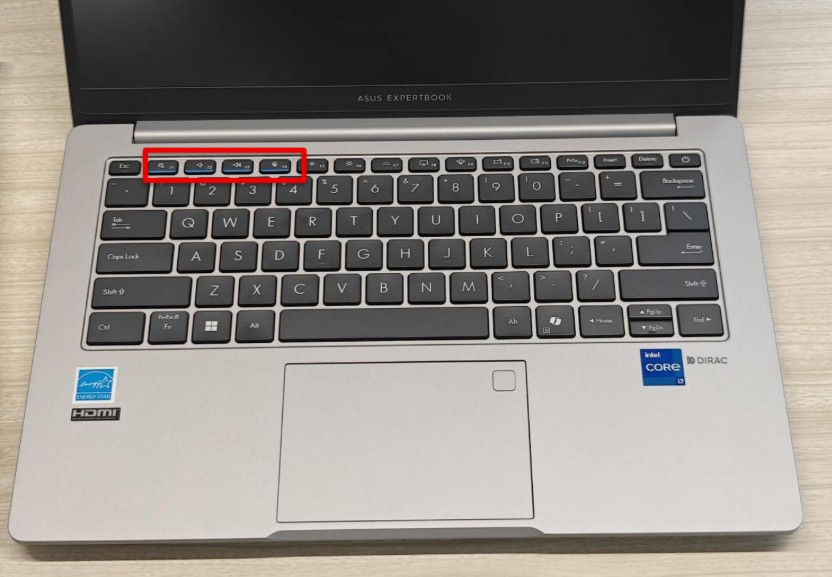 The ExpertBook B1 includes a full-sized spill-resistant keyboard with 1.35mm travel and a 180-degree hinge. The key feedback is decent, offering a comfortable typing experience during extended writing sessions. ASUS includes valuable additions, such as LED indicators for the microphone and mute keys small but practical features in the age of video meetings. The trackpad is standard in size and includes support for ASUS’ ExpertWidget shortcuts for quick task execution.
Security and Manageability for IT Teams 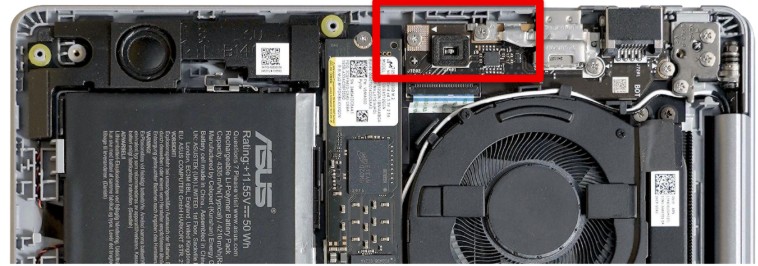 Security features are a strong point on this laptop. It includes Discrete TPM 2.0 and both fingerprint login (FIDO2 encryption) and IR camera support for Windows Hello. An optical chassis intrusion sensor provides alerts if the device is physically tampered with. Another standout feature is the Self-Healing BIOS, backed by dual EEPROM chips. In simple terms, if the BIOS (the foundational firmware of the laptop) gets corrupted due to a failed update or a cyberattack, the system can automatically restore a working version from the backup chip—helping reduce downtime and IT intervention. The BIOS also meets NIST SP 800-155 compliance, which is a U.S. cybersecurity standard that defines integrity monitoring and recovery mechanisms for BIOS-level attacks, further enhancing the laptop’s defense against advanced threats.
While I didn’t get to test these options firsthand, ASUS offers a range of factory-level customizations designed specifically for business and enterprise use. IT teams can request things like custom BIOS configurations, pre installed operating systems, company-branded boot logos, and even integration with Absolute Persistence, a tool used for device tracking and security management. What this essentially means is that companies can have their internal security policies and setup preferences embedded into the laptop before it even ships. Employees then receive a device that’s ready to use right out of the box, aligned with corporate standards. Impressively, ASUS provides these services even for small-batch orders, which makes them accessible not just to large enterprises, but also to SMBs and growing startups looking to streamline IT deployment.
Battery and Emergency Charging
The 65-watt USB-C adapter supports Power Delivery and PPS, charging the laptop to about 60 percent in under 50 minutes. In daily use, battery life stays steady for a full workday depending on workload. Notably, the B1403CVA can also charge via USB-C power banks, even low-wattage models. This is not a fast charge, but in emergencies it can extend uptime just enough to finish a meeting or send a last-minute email. It’s a thoughtful backup option that reflects the laptop’s business-first design.
AI and Software Features
ASUS has introduced a few AI-driven enhancements in its newer models, including AI-based noise cancellation and camera framing for video calls. These are useful additions in hybrid work environments, helping improve call quality without requiring third-party software. All features run locally on the device, eliminating the need for cloud connectivity to perform these tasks.
Support That Complements the Hardware
ASUS backs the ExpertBook B1 with toll-free support (9 AM to 9 PM, Monday to Saturday) and onsite service coverage across 14,900+ pin codes in India. Users also benefit from 1-year accidental damage protection, a global warranty in over 80 countries by default, and the MyASUS app for diagnostics, updates, and support tracking. Interactions with the sales teams as anonymous have been easy.
Verdict:
The ASUS ExpertBook B1403CVA keeps its focus squarely on business needs, offering reliable performance, strong security, and durability that goes beyond the basics. It doesn’t chase flashy design or gimmicks, but instead delivers thoughtful features like power bank charging, BIOS self-healing, and factory-level IT customizations that genuinely help in everyday business use.
There are a few trade-offs, like a modest display and a rather understated look, but for professionals or IT teams who care more about stability, manageability, and long-term value, this laptop makes a strong case for itself. It’s a practical, no-nonsense machine that feels purpose-built for today’s working environments.
Key specs of the ASUS ExpertBook B1:
∙ Processor: Intel® Core™ i7-13620H (10 cores, 16 threads, up to 4.9 GHz)
∙ Graphics: Intel® UHD integrated graphics
∙ Memory: Up to 64GB DDR5 5200 MT/s (2x SO-DIMM slots)
∙ Storage: Up to 2TB via dual PCIe Gen 4 SSD slots (RAID 0/1 support)
∙ Display: 14-inch Full HD (1920 x 1080), anti-glare IPS, 178° wide-view, up to 300 nits ∙ Durability: MIL-STD 810H certified with reinforced ports, 66cc spill-resistant keyboard, and 50,000-cycle hinge testing
∙ Security: Discrete TPM 2.0, self-healing BIOS (dual EEPROM), fingerprint reader (FIDO2), IR camera (Windows Hello), chassis intrusion alert
∙ Connectivity: USB-A, USB-C (PD + Display), HDMI, LAN (RJ45), MicroSD slot, optional Smart Card reader
∙ Wireless: Wi-Fi 6E and Bluetooth 5.4
∙ Battery: 3-cell 63Wh with 65W USB-C PD charger; supports charging via power banks ∙ Weight & Build: 1.42kg, under 20mm thick, reinforced C-frame design
∙ OS: Windows 11 Pro
∙ Support & Warranty: Onsite service across 14,900+ pin codes, 1-year accidental damage protection, global warranty in 80+ countries, MyASUS app & Control Center tools