
Microsoft is reimagining some of its most iconic tools—Notepad, Paint, and the Snipping Tool—by embedding powerful generative AI capabilities into the heart of Windows 11. In a major update rolling out to Windows Insiders in the Canary and Dev channels, users will now be able to do much more with these classic apps, thanks to Microsoft’s AI-powered Copilot.
Notepad Gets a “Write” Boost with AI
The biggest headline is Notepad’s new “Write” feature, which can now generate text based on your prompts using generative AI. Whether you’re drafting content from scratch or expanding on existing ideas, this tool allows users to:
-
Right-click to insert AI-generated text.
-
Highlight existing content to expand or build upon it.
-
Input prompts via the Copilot menu and refine the output with follow-up instructions.
This new feature is part of a growing suite of AI tools in Notepad. Earlier, Microsoft had introduced:
-
Summarize: Generates concise summaries of your documents.
-
Rewrite: Alters the tone, length, or phrasing of text.
Together, these features are turning Notepad from a basic text editor into a powerful writing assistant.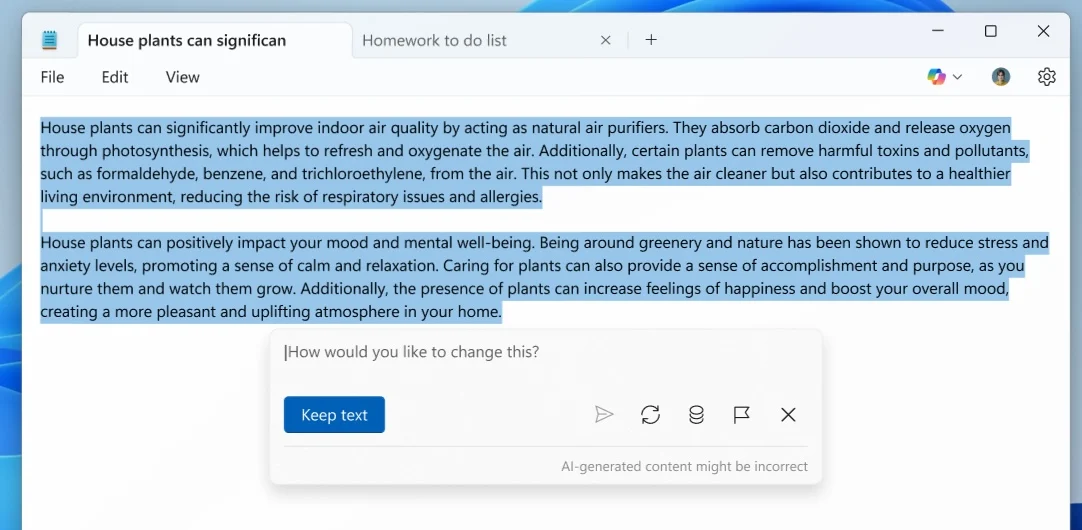 Microsoft Paint Evolves with AI Stickers and Smart Tools
Not to be outdone, Microsoft Paint is also seeing an AI makeover. Joining existing tools like Generative Fill, Generative Erase, and the Cocreator tool (which generates images from text and sketches), the new Sticker Generator allows users to:
-
Describe a sticker using text prompts.
-
Automatically generate sticker options.
-
Add or copy them directly into other projects.
Another major addition is the Object Select tool, which uses AI to intelligently isolate objects in an image, removing the manual effort traditionally needed for precision selections.
Snipping Tool Gets Smarter Screenshots
The Snipping Tool is being upgraded to make capturing content faster and smarter with the new Perfect Screenshot button. This AI-powered feature can:
-
Auto-resize your screenshot region based on content.
-
Still allow manual adjustment for finer control.
Also new is a Color Picker, enabling users to view HEX, RGB, or HSL values using an eyedropper tool. For added accuracy, users can zoom with mouse scroll or keyboard shortcuts.
Access and Availability
To use the new Notepad Write feature and other AI enhancements, users must be signed into their Microsoft account. These tools will rely on Microsoft’s credits system used for other AI features in Windows 11. While the company hasn’t yet disclosed pricing, it may introduce fees in the future.
The Future of Windows is AI-Integrated
With these updates, Microsoft is transforming everyday apps into intelligent, AI-powered companions, streamlining tasks that once required external tools or manual effort. Whether you’re writing code, editing images, or capturing screen content, AI in Windows 11 is stepping in to save time and boost creativity.
Stay tuned as these features roll out more widely—and expect more surprises as Microsoft continues its Copilot-powered evolution across the Windows ecosystem.